In a world that’s more connected than ever, it’s easy to forget just how fragile our communication networks can be. A major storm, power outage, or regional emergency can bring down cell towers and internet services rapidly. For those of us who value preparedness, off-grid communication tools are not just a luxury they’re a necessity. That’s where the Meshtastic LilyGo T-Beam comes in. It allows text-based communications on the mesh network from Node to Node. You can transmit without needing a license.
What is Meshtastic?
Meshtastic is an open-source project. Combined with hardware and phone applications, it lets people communicate using low-power radios. This can be done without needing cell service or Wi-Fi. It’s great for off-grid adventures, emergency situations, or just tinkering with radios and learning technology. Devices running Meshtastic create their own network (mesh), allowing users to send text messages and GPS data over long distances. It’s a fun and practical tool for staying connected when traditional networks aren’t available.

What is the Meshtastic LilyGo T-Beam?
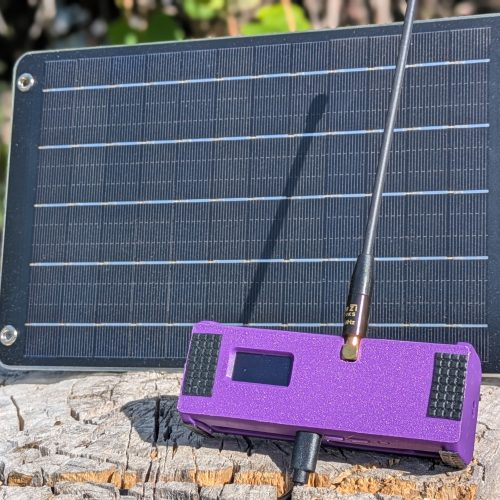
The LilyGo T-Beam is a small, lightweight device that runs Meshtastic out of the box. The T-Beam uses low-power LoRa (Long Range) radio technology. It allows you to quickly set up and start sending messages to other Meshtastic users. Some other meshtastic devices require the assembly of antennas, batteries, or other modules. This device is all-in-one and ready to go right out of the box. Less hassle means this device is more accessible for family and friends you want to stay in contact with in emergency situations. The T-Beam does come with everything you need to get started, however it does not come with a case. There are a lot of case options out there with some being as simple as the plastic case that it came in (requires a hole to be drilled in the plastic enclosure). But we opted for a 3D printed case (thanks to a friend).
This blog may earn a small commission from purchases made through links on this page, at no additional cost to you. These affiliate links help support the blog’s upkeep and allow us to continue creating valuable content for our readers. Thank you for your support!


LILYGO T-Beam Meshtastic LORA32 915MHz
Meshtastic preinstalled, Power, Program and Reset switches and battery holder
Buy Now on AmazonAntenna Upgrade Recommended
The antenna that comes with the T-Beam is not great by any means. We were able to establish comms and discover nodes around us. However, we noticed that the signal was pretty weak. We also found others online reporting the stock antenna was nothing to write home about. We opted for a slight upgrade with the Muzi Works Whip Antenna for only $12 more, and it has drastically improved our signal strength seen by nearby nodes.


915Mhz Whip Antenna for LoRa and Meshtastic
Upgrade your antenna to this flexible whip design.
Buy Now on AmazonAdditional Accessories for a reliable node – Batteries and Solar panel

JESSY 18650 Rechargeable Battery Flat Top
Rechargeable battery: JESSY 3.7V Lithium Battery, this is flat-top rechargeable Batteries, Size 18 * 65 * 18mm
Buy Now on Amazon
Mini 6W Solar Panel Charger USB 5V
USB Solar Panel: built in USB-A output port(max 5v/1a)
Buy Now on AmazonWhy It Matters for Off-Grid Communication
1. True Off-Grid Messaging
One of the greatest benefits of the T-Beam is that it works entirely off-grid. This means you can still communicate even when the infrastructure most of us rely on is down or unavailable. Whether you’re camping in the mountains, hiking a backcountry trail, or responding to a local emergency, Meshtastic ensures you have a way to stay in touch with others in your group. It does not rely on any established communications network, it creates it’s own.
2. Mesh Networking
Each Meshtastic device acts as a repeater in a mesh network. That means even if you’re not within direct range of the person you’re trying to contact, your message can hop through other nodes in the network to reach its destination. The more people in your area using Meshtastic, the more robust and far-reaching the network becomes. You may not be able to reach hundreds of miles away. However, communicating locally is still vital, especially when considering disaster recovery (localized emergency requires local comms).
3. GPS Location Sharing
The T-Beam includes a built-in GPS module, which allows you to broadcast your location in real-time. This is especially useful for group coordination during hikes, search and rescue efforts, or emergency response scenarios. If someone gets separated or goes silent, you can track their last known location. This is optional and there are settings to show your relative position within a few mile radius. If you use this for emergency purposes, it is recommended to show accurate locations. Provide frequent updates so responders can track you in real time.
4. Emergency and Disaster Preparedness
When disasters strike, whether it’s wildfires, hurricanes, earthquakes, or blackouts—traditional communication channels often go down first. The T-Beam gives you an independent line of communication you can rely on when you need it most. For prepared citizens, off-grid campers, and community organizers, it’s an indispensable tool for information sharing and intel gathering. For more articles about preparedness check out our Stop the Bleed article.
5. Power Efficient and Portable
Designed with preparedness in mind, the T-Beam is extremely power-efficient. A standard 18650 battery can keep it running for days. Paired with a small solar charger or power bank, and you’ve got a sustainable off-grid solution that fits in your pocket or easily strapped to the back of your rucksack.
Real-World Use Cases for meshtastic
- Backcountry Adventures: Hikers, backpackers, and campers can stay connected across long distances, even in areas without cell service.
- Emergency Kits: Add a pair (or more) of T-Beams to your go-bag or bug-out bag for reliable communication during blackouts or disasters.
- Community Resilience: Neighborhood groups or preparedness communities can form localized networks to stay coordinated and informed.
- Events and Festivals: Use Meshtastic devices to stay in touch in crowded, low-signal environments like outdoor festivals or large events. Events like Burning Man typically don’t have cellular communications established. An event provider may provide wifi, but it’s always best to be self-reliant.
Getting Started with Meshtastic
Setting up the LilyGo T-Beam with Meshtastic is easier than you might think:
- Get the Hardware: Get one LilyGo T-Beam if you want to connect to the local mesh and communicate with the established nodes. Get two LilyGo T-Beam devices if you are trying to establish communications with a nearby family member or friend.
- Install/Update Meshtastic Firmware: When purchasing these from amazon there is an option to buy it with the firmware installed. If you don’t chose that option you will need to flash the firmware using the official Meshtastic tools. It’s a lot easier than it sounds.
- Connect via App: Download the Meshtastic mobile app (iOS/Android) and connect your meshtastic device via Bluetooth.
- Join or Create a Channel: Set a shared encryption key for your group and you’re ready to communicate! The Long Fast channel is the default “Open Chat” for all the nodes in your area and we recommend running some tests and verifying you can get messages from others in that channel.
A Word on Encryption and Security
Meshtastic uses AES-256 encryption for secure messaging. That means your communications are private and protected, even in the event someone intercepts a signal. For prepared citizens concerned about privacy, this is a major advantage over open radio systems.
Final Thoughts
The Meshtastic LilyGo T-Beam isn’t just a gadget, it’s a lifeline. In times of crisis or off-grid exploration, it ensures you stay connected when it matters most. For less than the cost of a monthly cell phone bill, you can own a pair of devices that could one day make all the difference.
This isn’t mean to be the end all be all setup and deep dive into Meshtastic, there are plenty of better resources out there for that. We recommend consulting the official Documentation for it.
There is also a vast amount of knowledge on Youtube regarding Meshtastic builds, setup guides and various deep dives into it. Some of our favorite videos surrounding Meshtastic are by S2 Underground and The Comms Channel.